
Hmm
Couldn't reach the server. Check your connection and try again.
🔒 Waiting for approval
This is a new device on your account. For your security, another device that's already signed in needs to approve it before it gets access - or it'll auto-approve after 24 hours if nobody rejects it.
On a device that's already signed in: open Settings → Devices, and tap Approve. If you don't have another signed-in device, just wait - your new device will activate automatically tomorrow.
If you didn't try to sign in here, ignore this and reject from your other device. The unauthorized session will be locked out.
Welcome to Relief
Before we start, the basics:
- This is a private app for two adults already in a relationship - it's not a dating app, social network, or place to meet people.
- You'll share a private code with one specific partner. That code is the only way into your shared space. Treat it like a password.
- The content you share is encrypted before it leaves your device. We can't read it. The trade-off: if both of you forget the code AND lose every signed-in device, your encrypted history can't be recovered.
- You both must be at least 18 to use Relief.
- Anything you share is between the two of you. Don't share content of anyone who hasn't consented to it. Don't share content of anyone under 18, ever.
A private space, just for the two of you.
Relief is a quiet, encrypted app for couples - especially when you're apart. Notes, photos, intimate moments, encrypted on your device before they leave it. Nobody can read them but you and your partner. Not us. Not anyone.

Relief
Both partners install on their own phones, then link with a shared code.
Now on the App Store
Set up your couple and start using Relief on iPhone in minutes.


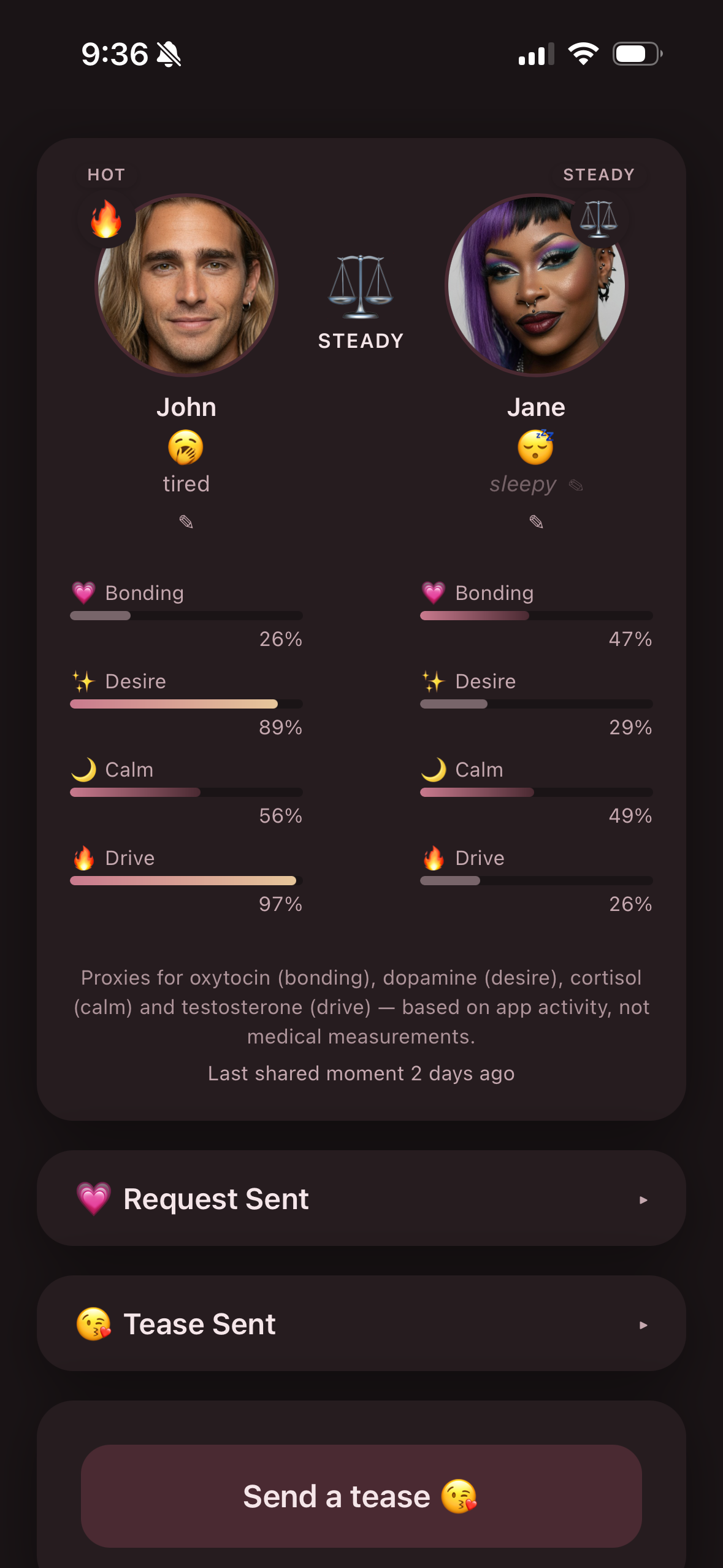
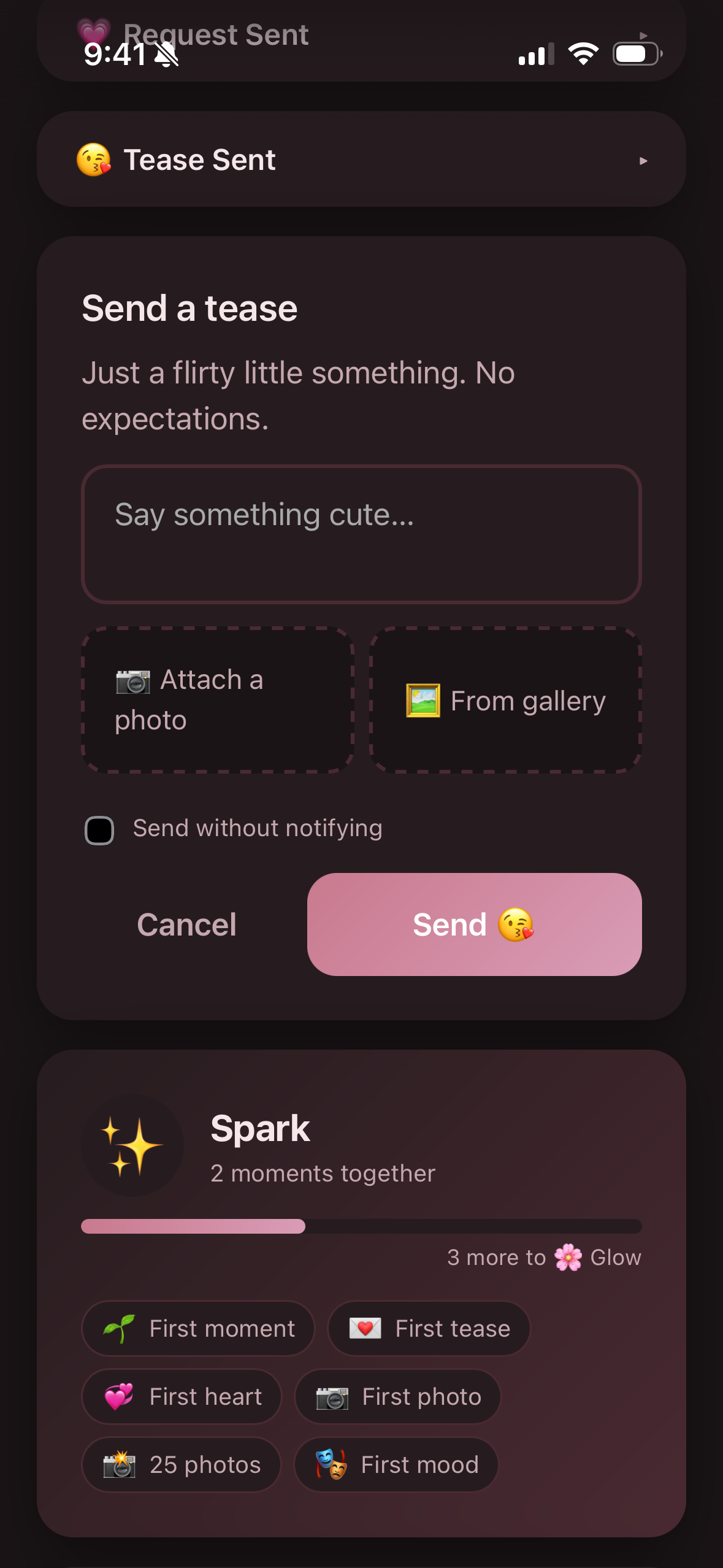
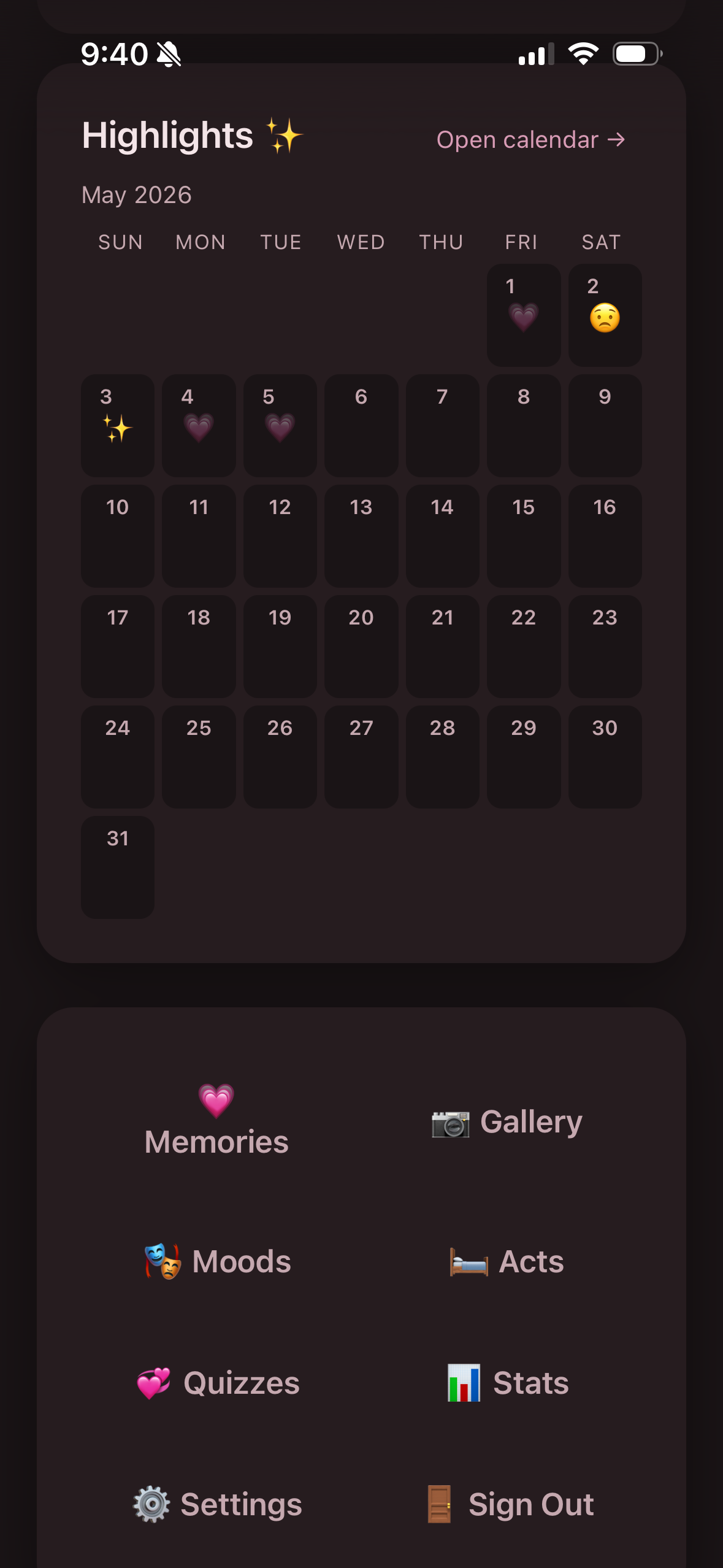
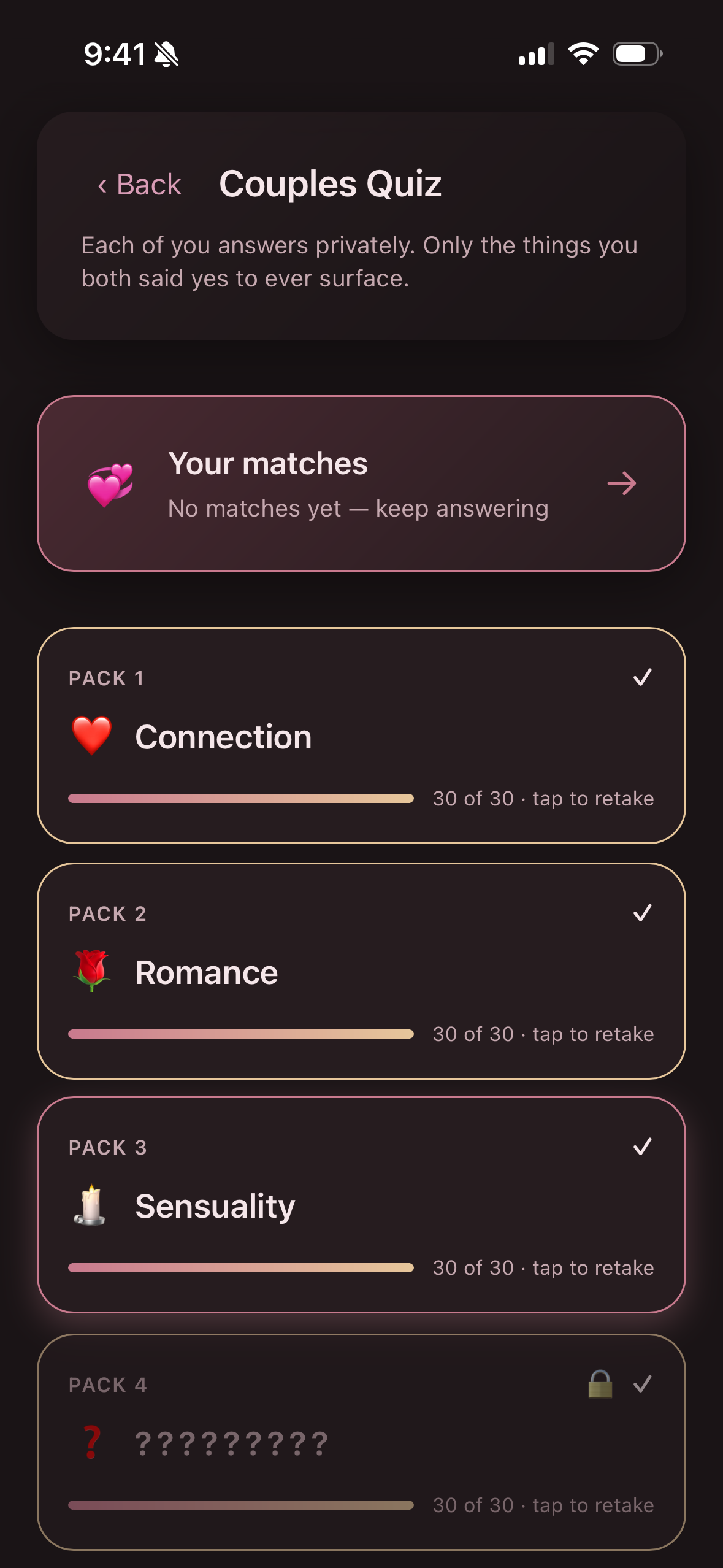
See it in action
A few moments from inside the app - same warm aesthetic, end to end.
What is Relief?
A small, principled tool for two people in a relationship to stay connected through the moments that don't fit anywhere else. It's not a social network. It's not a dating app. It's not for sharing publicly. It's just you and your partner, in a space that's only the two of you.
Built for couples who want a low-pressure way to express interest, share intimate moments, track moods together, and look back on the rhythm of their relationship - all in a single private app, with no algorithms watching and no audience listening.
🔐 Encrypted on your device. Always.
When you write a note, send a photo, or log a moment, your phone scrambles the content with a key that's derived from a code only you and your partner share. The scrambled version is what reaches our servers. We never see the readable version, and we cannot decrypt it ourselves - even if compelled to.
That includes your names and your email address. Both are encrypted with the same key - we can't read them either. Practically, that means we literally cannot send you marketing emails, sell your address to a third party, or tie a couple ID back to a real human in our database. Email exists in our system only so it can be relayed to your inbox during the few moments the app actually needs to email you (verification codes, new-device alerts).
The same kind of encryption that protects Signal messages and iMessage. Industry-standard AES-256-GCM with PBKDF2 key derivation (200,000 iterations, per-couple salt). You and your partner are the only people who can read what's in your account.
Made for the moments you can't share in person
Relief works beautifully for couples who live together, but it was shaped by the rhythms of partners who spend real time apart - different time zones, deployments, weeks on the road, the early haze of a newborn. The app holds the connection through the gap.
Long distance
Different time zones, the same connection. Teases land when they wake; moods stay current even when you can't talk.
🪖Deployment
Stay close through the months you can't talk freely. End-to-end encryption means nothing on the server can be read - by us or anyone else.
🧳Travel-heavy work
Pilots, consultants, touring artists, road crews - when your rhythm is weeks together, weeks apart, this is the thread that runs through both.
🌙New parents
Reconnect quietly when sleep, mood, and intimacy have all shifted at once. No pressure, no performance - just a gentle way back to each other.
What you can do together
Send a Tease
A flirty note or photo to brighten their day. Heart it back to say it landed.
Make a request
A direct ask, with no pressure. Mark it fulfilled when the moment happens - or let it simmer.
Take the couples quiz
Answer privately on your own. Only what you both said yes to ever surfaces - express interest without the awkwardness of an unwanted no.
Share moods
A shared palette of feelings. See your patterns over time. Even gently note your partner's mood when they go quiet.
A private gallery
Photos stay encrypted on the server, decrypted only on your devices. Never lose them to a phone backup.
See the rhythm
A weekly summary, a highlights calendar, and a memories timeline of your moments together over months.
Quiet stats
Charts of your activity over time - moods, hearts, fulfilled moments. Honest patterns, just for the two of you. No leaderboards, no scores.
Mark the moments
A connection level that only goes up. No streaks to break. No guilt mechanics. Just a record of your moments together.
The couples quiz, in detail
Six themed packs that walk you and your partner from everyday closeness to bolder territory - at your own pace. Answer separately on your own devices. Matches surface only on questions you both rated highly. Everything else stays invisible to both of you.
You start at Connection, where the questions are gentle. Each pack you complete reveals the next - a slow opening of the door that respects everyone's pace. Bolder packs gate behind a one-time confirmation, and you can decline any of them at the door without your partner being told you skipped it.
Yes-tier ratings (Likely, Definitely) lock once saved - they can shift between each other on retakes, but don't move back down. That asymmetry is what makes the matches honest.
Designed for honesty, not pressure
- 1Counters only go up.
No streaks to break. No "you've been quiet" guilt. The app celebrates moments - it never withholds.
- 2Lock-screen safe.
Notification text is intentionally generic. Sensitive content stays inside the app, behind authentication.
- 3Mood is expressive, not gating.
Sharing how you feel never blocks anything. You're communicating, not switching the app on or off for your partner.
- 4Each partner only deletes their own.
Nobody can nuke the other's history in a moment of frustration. Years of shared moments are protected from emotional decisions.
- 5Useful even when one of you is quieter.
The app holds up if engagement is asymmetric. A duet when both partners are reaching, a single-user journal of shared experience when needed.
- 6No comparison to other couples.
Your stats are yours. No leaderboards, no "couples like you" benchmarks, no anonymized averages. The numbers only mean what the two of you decide they mean.
Common questions
How is this different from a regular note-sharing app / iMessage?
iMessage isn't designed around the rhythms of a relationship. Relief is. The mood tracking, the request-and-fulfill cycle, the connection counter, the shared calendar of moments - all of these surface relationship patterns that text threads can't. And unlike iMessage, the encryption isn't tied to one company's account; it's a code only you and your partner share.
What happens if we lose our code?
Any device that's still signed in can show the code in Settings. If both of you lose the code AND every signed-in device, the encrypted content can't be recovered - that's the cost of true end-to-end encryption (the same property that protects Signal, iCloud Keychain, ProtonMail).
Can someone with our code break in?
The code is the key, so anyone you give it to can read your private content. Treat it like a password. To soften the consequences if it leaks, the app refuses to activate a new device until either an already-approved device approves it, or 24 hours pass with no rejection. New device sign-ins also send a notification to your verified email. So if someone tries to use a leaked code on their device, you'll see and can reject it.
Do you have access to my photos and messages?
No. Photos and messages are encrypted on your phone before they reach our servers. We only ever store the scrambled (ciphertext) version. Even if a court ordered us to hand over your data, we'd hand over ciphertext that can't be decrypted without the code we never see.
Are you tracking us?
No. No analytics SDKs, no third-party trackers, no ad libraries, no location data, no contact list access. The only data we collect is what's needed to make the app work - and even then, your names and your email are encrypted with your couple's key so we can't read them either. We can't market to you because we literally don't know who you are.
What about my partner - they have to use this too, right?
Yes. Relief is partner-to-partner by design. One of you creates the couple, gets a code, and shares it with the other. Both partners install the app on their own devices and sign in with the same code. That said, a partner isn't required - if you just want to track moods and intimacy for yourself, you can use it solo.
How does the couples quiz work?
You and your partner each answer privately. Ratings are encrypted on your device before they reach our server. Matches surface only when you both rated something Likely or higher - every other answer stays invisible to both of you, forever. The quiz starts gentle and gradually escalates; bolder packs gate behind a one-time confirmation that you can decline at the door (your partner isn't told you skipped). The deepest tier surfaces only for couples who've earned their way there and explicitly opted in.
Is this only about physical intimacy?
No. Physical intimacy is part of what couples share, and Relief lets you log and reflect on those moments without pretending they don't exist - but the app is just as much about cuddles, mood check-ins, the small daily teases, the rhythm of being together.
How much does it cost?
Relief is free to use - moods, teases, requests, the calendar, and the couples quiz come standard for both partners. A subscription in the iPhone app unlocks unlimited photo support, available monthly or yearly through your Apple ID. You can cancel anytime in iOS Settings. We don't run ads.
Just two names
Use whatever you call each other. You can change them later.
Done ✨
Send this code to your love. They open the same site on their phone and tap "I have a code."
Tip: keep this code safe. It's also the password to your space.
Enter our code
Type the 12-character code to access your space.
Use a backup code
Enter one of your saved backup codes. It can only be used once — once you're back in, generate a fresh set in Settings and rotate the couple code.
Which one are you, love?
Tap your name.
Just confirming
You're linking as . Tap continue if that's right.
⚠️ Couldn't set up your starter list
We couldn't load default moods + acts when your couple was created. Tap to retry — this happens locally on your device, so your code stays private.
🔑 You're back in
You signed in with a backup code. The main couple code is still the one you forgot — rotate it now so you can join new devices later, and generate a fresh set of backup codes while you're at it.
🔑 Your couple code was rotated
Your partner changed your shared code. Memorize the new one — the old code no longer works.
Hi 💕
Waiting for your love to join — share your code with them.
🔒 Quick check — your code
This device hasn't seen your code yet, so it can't read your private messages or photos. Pop it in once and we'll remember.
Let's get it on your Home Screen ✨
Just a few taps. It'll only take a second.
It's the little square with an arrow pointing up. Look at the bottom of the screen — it's right between the back arrows and the bookmark icon.
Don't see a bottom toolbar? Tap once anywhere on this page, or scroll up a tiny bit, and it'll appear.
A menu pops up. Scroll past the row of app icons and tap the row that says "Add to Home Screen" with a little square-with-plus icon.
In the top-right corner. The Relief icon (a soft pink heart 💗) will appear on your Home Screen.
This part matters. Close Safari and tap the new Relief icon on your Home Screen. (If you stay in Safari, notifications won't work.)
If you tap "All done" but you're still in Safari, this same screen will keep showing up — that's just a reminder to open the Home Screen icon instead.
One little thing on iPhone
Add Relief to your Home Screen so we can send you gentle little notes from each other.
Turn on gentle notifications
Soft, loving little nudges — never more than twice a week, never anything risqué on the lock screen.
Notifications are blocked
That's OK — you can turn them on anytime in your phone's Settings → Notifications → Relief.
This device doesn't support push
That's fine — you can still use Relief in your browser. Notifications work best on iPhone (added to Home Screen) or desktop Chrome/Firefox.
hasn't updated in 12h. Make a guess at how they're feeling — they'll get a soft notification and can confirm or change it.
Proxies for oxytocin (bonding), dopamine (desire), cortisol (calm) and testosterone (drive) — based on app activity, not medical measurements.
It's been a stretch - work, sleep, energy. Most couples have stretches like this. If you'd like to lean toward connection, the app exists for exactly this.
Small bids almost always work better than big asks: a quiet tease, a short note, a request with no urgency.
Past the natural ebb most couples have. It doesn't mean anything is wrong - but it's worth a gentle check-in.
Worth naming: when teases or requests sit ignored, the sender starts to feel unheard. Sometimes the kindest move isn't waiting to feel desire - it's responding to a bid made. Even a heart on a sitting tease is a reach back. Even a small tease back, when you've been quiet, is enough.
Connection comes before desire for many people. The reach itself is often the thaw.
Stretches like this happen, and they're survivable. But they're worth naming rather than waiting out. Whatever's behind it - stress, distance, something unsaid - silence rarely dissolves it. And the longer one of you sends teases or requests that go unhearted and unanswered, the easier it is to start feeling invisible to the other.
The repair almost always starts with one bid. Then another. Then a small response.
Use the app for what it was built for - a low-pressure way to say I'm still reaching for you. Send a tease - even just an emoji. Heart something they sent. Make a request without expecting it to be fulfilled tonight.
Two months is real. Whatever started this stretch - stress, hurt, exhaustion, drift - it has become its own pattern now. That happens. It's not a verdict on your relationship.
What gets harder past this point: the longer the silence, the bigger every bid starts to feel. A simple tease can begin to feel like a confession. A small request can feel like an ultimatum. That's the gap distorting things, not the bid itself.
The app is built to keep the stakes small. A tease costs nothing. A heart on something sitting in your inbox costs nothing. A request without an agenda costs nothing.
If one of you has been sending into silence, this is where the reach gets seen. If one of you has been quiet, the simplest reach back is right here. Either side moves first - that's how the pattern shifts.
A quarter of a year. Most couples that get here didn't decide to - it accumulated, one tired night and one missed bid at a time, until silence became the mode.
The story each of you is telling yourself about this stretch matters more than the stretch itself. The mind fills the gap with rejection, inadequacy, contempt - none of which may be true. The bid is the only thing that interrupts that loop.
Long stuck-stretches in relationships almost never heal themselves. They heal when one person decides to act before they feel like it. Not a grand gesture - the smallest possible reach. A tease. A heart. A note that says you're still here.
No expectations. No timeline. Just the bid, on this side of the silence.
Four months. Be honest with yourself for a moment: the version of your relationship from before this stretch - does it feel like it's still there, or has it started to feel like a different time?
Either answer is valid. Both are common at this point. What's harder to admit is that whichever person is reading this - the one who's been reaching, the one who's been quiet - has been carrying something alone. Both of you have. The weight isn't the same in shape, but it's the same in toll.
Stretches this long don't usually break under their own pressure - they require deliberate softening. The way the app does that: small, repeated, no-stakes signals. Not a fix-it date. Not a confrontation. A tease. A heart. A note that just acknowledges they're still here.
If you've been doing all the reaching, your reach is not unwanted - it's just unanswered. If you've been on the quiet side, the door has not closed; the simplest gesture from you would land enormously right now.
Five months is approaching half a year. At this distance, two things usually become true at the same time: you both miss it, and you both don't know how to start.
What often makes this stretch worse is the assumption that whatever broke must be fixed before reconnection can happen. That's almost never how it works. Connection re-establishes first. Whatever needs fixing gets easier to talk about once you're not strangers in your own home.
The app stays low-stakes for exactly this reason. A tease isn't a vote on the future of the relationship. A heart isn't a contract. They're signals - I see you. I'm still here. I want to be on your side again.
If silence has been your protection, it's worth asking what it's protecting you from. If reaching has been your effort, it's worth knowing the reach has been received, even when it hasn't been answered. One bid, from wherever you are.
Six months. This isn't a stretch anymore - it's a chapter. And whatever you'd say about that chapter if you were honest with each other right now, neither of you is hearing it.
Stuck-stretches this long usually involve some grief. For who you were together, for what came easily, for the version of intimacy that used to not require this much thought. That grief is real, and the only honest path through it is acknowledging it - to yourself first, then to each other.
The app isn't the answer here. But it is a doorway. A tease at this distance is a small declaration that you're not done. A heart on something sitting in your inbox is a small declaration that you've been seen, even if you couldn't say so. A request, even one that won't be answered tonight, is the act of staying in the conversation.
Some couples find their way back from here. Most do, when at least one of them refuses to let silence be the final word. Be the one. Either of you. Both of you, if you can.
💗 is requesting relief
No words this time — just a sweet little ask.
What happened? Tap any that applied (optional).
When? Leave blank for "just now."
✨ It's on
You said yes to . Did the moment happen?
Tap any that applied (optional).
🌆 You said later
To 's request. sees that and won't be nudged again.
✨ Moment logged
Marked together with . 💗
🌙 Saved for later
Moments come and go. No worries.
Waiting on … 💭
It's been a while. You can send a new request to replace this if you want — or leave it simmering.
What happened? Tap any that applied (optional).
When? Leave blank for "just now."
said yes 💗
When the moment happens, mark it together so it counts.
Tap any that applied (optional).
Together with ✨
+1 in your moments.
Tap any that applied (optional).
Saving it for later 🌙
Moments come and go. No worries.
said later tonight 🌆
said not tonight, cuddle instead 🌙
😘 A Tease from
Tease sent to 💭
hearted your tease 💗
Release sent to 💭
hearted your release 💗
a release from
Send a Tease
Just a flirty little something. No expectations.
Ask for a moment
Optional note + optional photo. Whatever's on your mind.
Log a Moment ✨
For when it happened spontaneously, without a request.
Who started it?
When? Leave blank for today.
Tap any that applied (optional).
New release
🔔 Send custom alert
Lock-screen visible. Use sparingly — 5-min cooldown, 10/day cap.
This week ✨
Their cadence
Highlights ✨
Memories
No moments yet. They'll show up here as you mark them ✨
Requests
Nothing here yet.
Teases
Nothing here yet.
Settings
👤
What should we call you, and what defaults make sense?
💕
manages their own avatar.
Backup control — once picks one, it's locked to them.
Gender:
They can change this on their own device.
✉️ Email
✓ verified
We'll use this for security alerts. Per-user — has their own.
🔐 Encrypted with your couple key — even we can't read it.
Add an email so we can alert you about security events (new device sign-ins, code changes). Optional for now.
🔐 Encrypted on this device before it leaves — we can only read it for the seconds it takes to relay verification codes and security alerts.
✨ Subscription
Subscribed ✨ — unlimited photos across every feature. Thank you for supporting Relief.
Relief is free to use — text moods, requests, teases, releases, and the couples quiz are all unlimited. The paid tier unlocks unlimited photos on everything you do together.
On the free tier you can keep one photo per type — one tease photo, one request photo, and one moment photo from a fulfilled request. Subscribe to attach photos freely across every feature.
Loading subscription options…
Subscription options aren't available right now. If you just installed, give it a minute and try again — Apple sometimes takes a moment to surface them.
Auto-renewable subscription. Cancel anytime in the App Store — tap Manage Subscription after subscribing, or Settings → Apple ID → Subscriptions in iOS. Payment is charged to your Apple ID; renewal is automatic unless cancelled at least 24 hours before the end of the current period.
The paid tier is available in the iOS app. Open Relief on your iPhone to subscribe — your entitlement applies to both partners on every device.
Existing subscription found
Transfer it here — keep your existing subscription and move billing onto this couple. Product and renewal cycle don't change. The previous couple's content is permanently deleted.
— cancel your existing and subscribe fresh to . Apple will charge the new product going forward.
Old content is encrypted with a key you no longer have, so it can't be recovered either way — we delete the rows to keep things clean.
🎟️ Redeem an App Store Code
✨ Premium active. Thanks for supporting Relief.
Got an App Store offer code? Tap below to redeem it with Apple — Premium turns on automatically once it clears.
🎟️ Access Code
💎 Lifetime Tier 1 active. Custom images on teases and requests, with no slot limits. Thank you.
🛠️ Lifetime Codes
Existing codes
Loading…
No codes yet.
🪙 Cardano Wallet
Connect a Cardano wallet to check for eligible tokens.
Wallet linked ✨ — your access re-verifies each time you open the app. Welcome, and thank you for supporting our work.
Pick a wallet
No Cardano wallet detected in this browser. Install one (Lace, Eternl, Nami, Flint, Vespr…) and reload this page.
Working…
🔑 Couple Code
The code unlocks your encrypted history. Anyone with it can read everything in the couple — keep it close.
Show your code
If you've lost track of it, you can read it back on any signed-in device.
Save it somewhere safe (a password manager works). If both of you lose all signed-in devices and forget the code, your encrypted history can't be recovered.
Change your code
Change your shared code if you think someone else has seen it. Both of you will need the new code on any future devices.
Heads up before you continue:
- The current code stops working immediately.
- Your partner gets a notification and a banner with the new code on their next session.
- Write the new code down — if both of you lose it, the encrypted content can't be recovered.
Done. Your new couple code:
Save this somewhere safe. Your partner will see it on their next session.
🛟 Backup Codes
Single-use recovery codes. If you ever forget the couple code, any one of these can get you back in. Save them in a password manager or write them down somewhere safe.
unused code active. All previous codes have been used. No codes generated yet.
Save these codes now.
They won't be shown again. Each one can be used once if you ever lose the main couple code.
📦 Your Data
Download a complete copy of everything in your couple — moods, requests, teases, photos, the works. The browser decrypts everything and packages it into a ZIP: a relief-export.json with all your text + metadata, plus an images/ folder of normal photo files you can save anywhere. Includes content you and have authored.
Treat the ZIP like a private archive — anyone who can open it can read everything you've shared. This is for inspection and keepsakes, not a restore mechanism: the app can't import a ZIP back in. If you ever lose your couple code, your backup codes are how you recover access.
📱 Devices
Each device that signs in shows up here. New devices need approval before they get full access.
No devices yet.
🔔 Notifications
You're all set ✨ — try a test ping if you want to confirm.
🌓 Appearance
Match your device's preference, or pin a single theme.
👀 Read Receipts
Be accountable to your partner about what you've seen of theirs. Default off; each option strictly adds to what they're told.
📓 Solo Release Log
A private, opt-in journal for your own solo releases (masturbation). Only you see what's logged here.
Your partner turned on Transparent mode. Their entries appear on your dashboard already; enabling here lets you log your own.
Your partner is sharing their cadence (the dot strip on your dashboard). You can opt in here if you'd like to log your own too.
The Solo Release Log was unlocked for you. You can opt in here whenever you're ready — Silent mode keeps your entries private.
Currently off. Turning it on enables Silent mode — entries are private to you, nothing is shared with your partner, and your shared stats aren't affected.
Pick a mode — tap to stage, then Save:
🧭 Walkthroughs
A guided tour of what each part of the app does. Replay any time you want a refresher.
ℹ️ About
Built for two people. Encrypted on your device — we can't read your private content.
📸 Screenshot Mode
Renames you to John and your partner to Jane, and blanks both avatars. Use it when capturing App Store screenshots so the real couple's identity stays private. Toggling reloads the app.
🐣 ASCII Pet
A tiny creature that lives between your avatars and reacts to your couple mood. A little companion — off unless you want it.
Tap the pet to play or pause it. (Animation off is gentler if motion bothers you.)
Adds sliders under your stats to play with both partners' levels and watch the mood + pet react in real time. Just for fun — nothing is saved or shared.
👋 Leave The Couple
Removes your account and everything you authored — your photos, notes, moods, requests, and teases. keeps everything they authored and can keep using the app solo.
If has already left, the couple itself will be removed at the same time. You'll be asked to type your couple code to confirm. You're the last user in the couple, so this also removes the couple itself. You'll be asked to type your couple code to confirm.
Manage moods
The two of you share this list. Tag each mood with who it applies to — only relevant moods show up in your picker.
Add a new mood
Our list
Nothing yet. Add one above to get started, or restore the default list:
My releases
Silent mode — these are visible only to you.
Frequency mode — your partner sees the count and dates only, no detail.
Transparent mode — your partner sees full entries on their dashboard for 12 hours.
Currently off — historical entries shown below. Enable a mode in Settings to log new ones.
New release
📓
No entries yet. Log one whenever the moment passes.
(no note)
Manage acts
The two of you share this list. Add anything you'd want to tag a moment with; remove anything you don't.
Add a new act
Your list
Nothing yet. Add one above to get started, or restore the default list:
Our gallery
No photos here yet. Send a tease or attach one to a request and it'll show up.
No note
Stats
Activity
Engagement timeline
No activity in this range.
Rhythm
Reciprocity
Who's driving each axis.
Hearted ratio
Share of teases that landed.
Fulfillment rate
Share of requests that reached fulfillment.
Request outcomes
No requests in this range.
Most-shared acts
No acts in this range.
Mood frequency
Top moods logged.
—
—
Day of week
Engagement intensity per weekday.
Calendar
Nothing logged this day.
No moods logged this day.
No teases this day.
No requests this day.
No acts this day.
Couples Quiz
Each of you answers privately. Only the things you both said yes to ever surface.
Before you start
This is a couples quiz where matches surface when you and both rate something Likely or higher. The experience depends on honest answers from you and . Please read the rules, then tap I understand.
Once you save, ratings of 4 (Likely) or 5 (Definitely) are locked in as a yes. Future retakes let you shift between 4 and 5 — but you cannot move them back to 3 (Maybe), 2 (Unlikely), or 1 (Never). No backsies after save.
Rating something 3 (Maybe), 2 (Unlikely), or 1 (Never) does not lock. Maybe means just that — undecided, does not match, can move in any direction later. The same goes for the two no-tier ratings: if your feelings shift, you can move any of them up.
Make sure your answer is honest, and be prepared for to potentially match it. If you're not comfortable with that, don't tap Likely or Definitely on questions you're not comfortable with knowing.
While answering a pack, you can revise any answer freely — Back walks back as far as you want. Saving happens when you finish a pack or tap Save Progress. If you leave a pack without saving, your in-pack answers won't be kept.
Quiz couldn't load
Run db/migrations/021_quiz.sql and then
notes/quiz_seed.sql on the database.
No packs yet
The question pool hasn't been seeded.
Lovely — you answered every question in this pack. Head back to see your matches or try another pack. You walked through every question. Anything you tweaked is saved.
No questions to show
This pack came back empty. The question pool may not be seeded for this pack.
Admin: verify with SELECT COUNT(*) FROM quiz_questions WHERE pack = ;
Your matches
Things you both said yes to. The tier shows how close your enthusiasm matched.
No matches in this view yet. Answer more questions together.
No misses in this view.
Heads up — explicit content
This pack contains questions about sex — oral, positions, toys, and more. You can decline this pack and keep going with the others; your partner will not be told that you skipped it.
Ready to continue?
Heads up — adventurous content
This pack pushes past mainstream sex into more adventurous territory — exhibitionism-curious moments, light role play, watching each other, filming or photographing, sex in less private places. You can decline this pack and keep going with the others; your partner will not be told that you skipped it.
Ready to continue?
Heads up — kink-curious content
This pack contains kink-curious questions — light bondage, role play, power dynamics, and similar territory. You can decline and keep going with the other packs; your partner will not be told that you skipped it.
Ready to continue?
Save before leaving?
You have unsaved answers in this pack. Save them now, or discard and leave?
Skip this walkthrough?
No problem — you can always replay it from Settings → Walkthroughs. Want to skip the rest of this one?
Nice work 💕
There's a few more handy bits to show you. Want to keep going, or take a break?